Ordering your prescriptions, step by step

There are three ways to order with us. Most of our customers order medication for their pets, so we've put that first. Choose the route that fits you.

Most popular
For your pet
Veterinary prescriptions
Order your pet's medication from a written vet prescription.
See the full guide
For you
Private prescriptions
Human medicines prescribed privately, not on the NHS.
How it works
For you
NHS repeat prescriptions
Free NHS dispensing and delivery to your door.
How it works
Veterinary prescriptions

How to order your pet's medication

Follow the 14 steps below from start to finish. Each one shows you exactly what you'll see on screen.
01
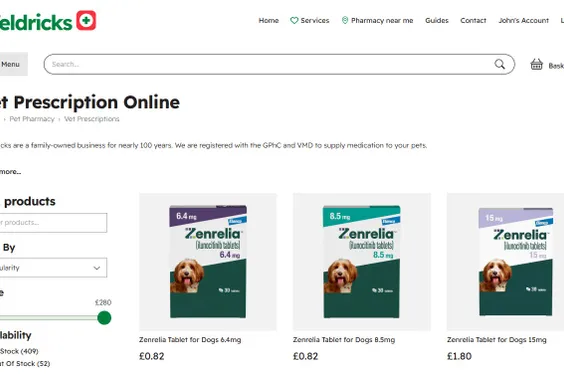
Search for your product
Use the search bar or browse Vet Prescription Online to find your pet's medication.
Step 1: Search for your product
02
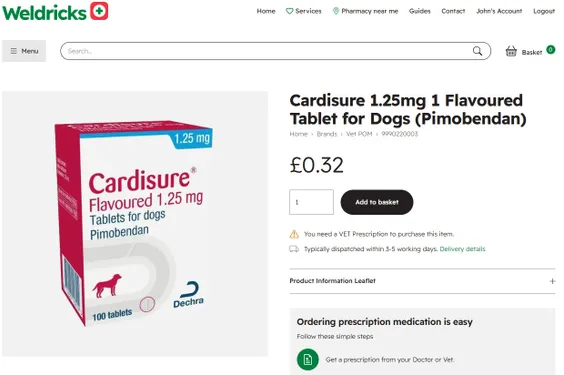
Add it to your basket
Open the product and choose 'Add to basket'. Items that need a prescription are clearly flagged.
Step 2: Add it to your basket
03
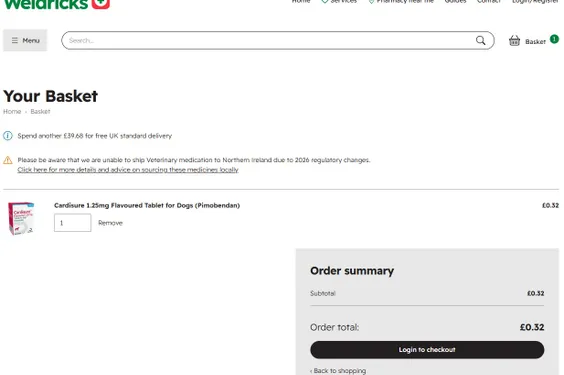
Go to your basket
Add any other products you need, then open your basket and choose 'Login to checkout'.
Step 3: Go to your basket
04
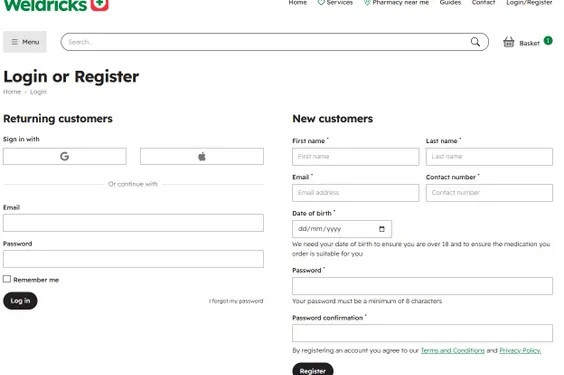
Log in or register
Sign in, or create an account. New customers need a date of birth so we can confirm you're over 18.
Step 4: Log in or register
05
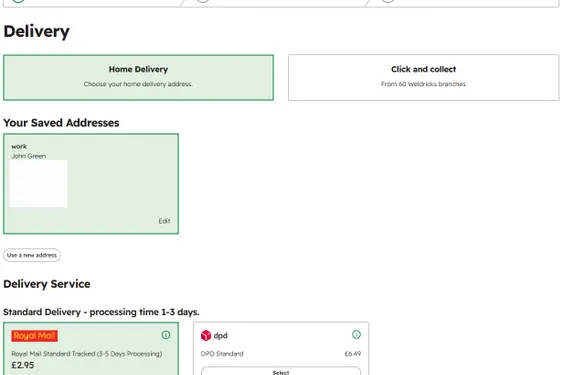
Choose your delivery
Pick home delivery or click & collect, then a delivery service. Some delivery types may be restricted depending on your product.
Step 5: Choose your delivery
06
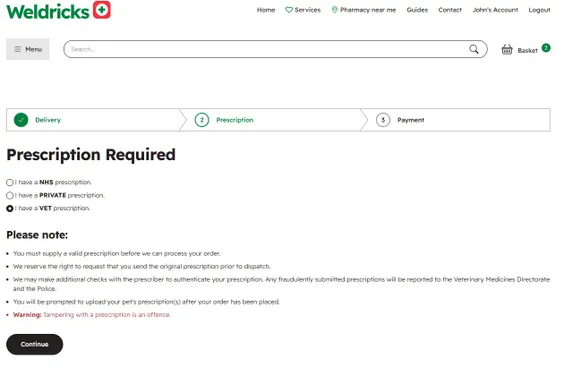
Tell us your prescription type
Select NHS, Private or Vet. For your pet's medication, choose 'I have a VET prescription'.
Step 6: Tell us your prescription type
07
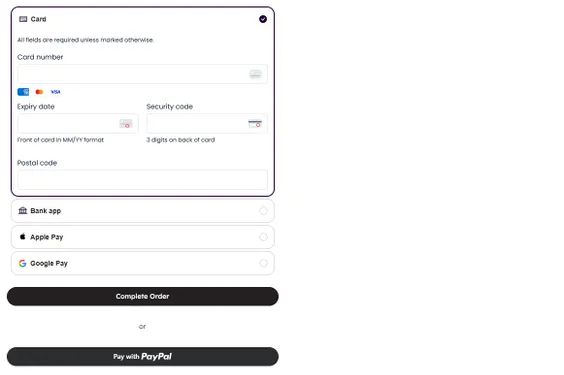
Make your payment
Pay by card, bank app, Apple Pay, Google Pay or PayPal. Nothing is dispensed until we've checked your prescription.
Step 7: Make your payment
08
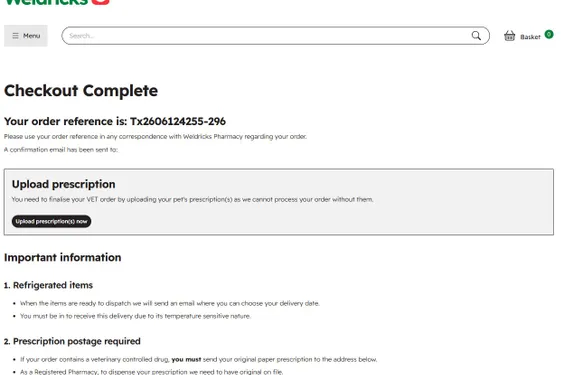
Note your order reference
You'll get an order reference and a confirmation email. Quote it in any correspondence, and write it on any posted prescription. Then choose 'Upload prescription(s) now'.
Step 8: Note your order reference
09
Add your pet
On the prescriptions page choose 'Add a new pet'. Pets you've ordered for before will already be listed.
Step 9: Add your pet
10
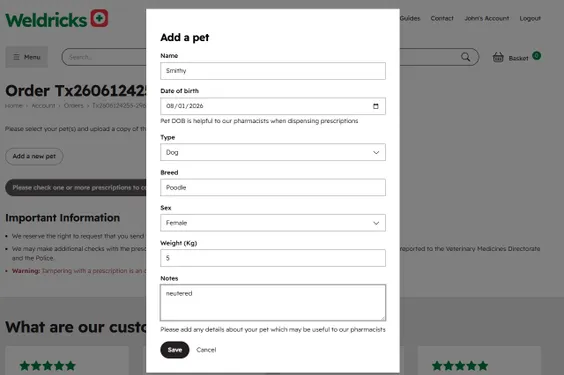
Enter your pet's details
Add your pet's name, date of birth, breed, weight and any notes that help our pharmacists, then save.
Step 10: Enter your pet's details
11
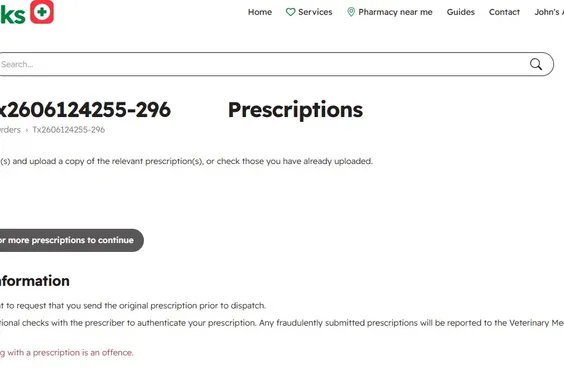
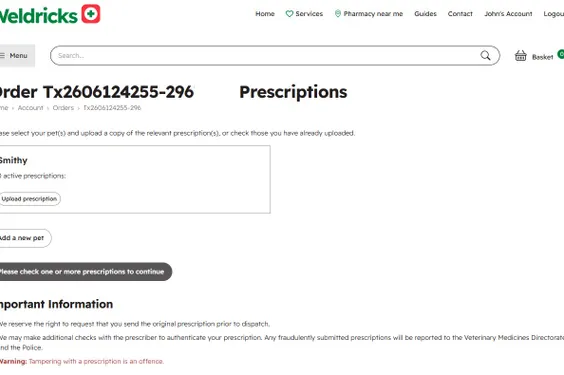
Choose 'Upload prescription'
Your pet now appears in the list. Select 'Upload prescription' to add their written prescription.
Step 11: Choose 'Upload prescription
12
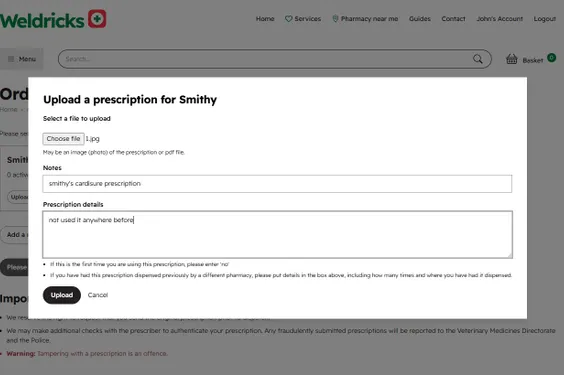
Upload the prescription
Attach a photo or PDF of the prescription, and tell us whether it has been dispensed elsewhere before, then upload.
Step 12: Upload the prescription
13
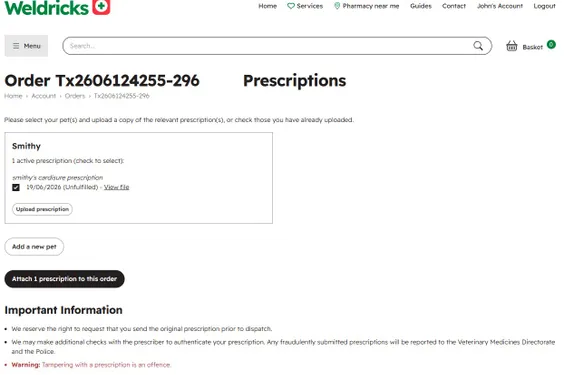
Attach it to your order
Tick the prescription(s) that apply to this order, then choose 'Attach prescription to this order'.
Step 13: Attach it to your order
14
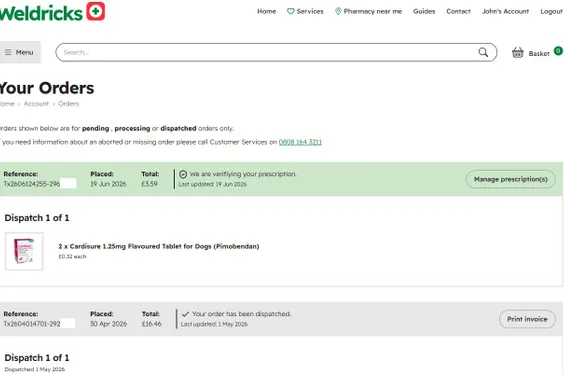
Track your order
That's it. Open 'My Orders' to follow progress — you'll see when we're verifying your prescription and when it's dispatched.
Step 14: Track your order
i
Controlled drugs need the original. You can upload a copy so we can start work, but we must receive the original paper prescription by post before we dispatch. Write your order reference at the top of it.
!
Vet sending it directly? If your vet is posting the prescription to us, please ask them to include your order reference so we can match it to your order.
For you

Private (human) prescriptions

The checkout is the same as above. At the prescription step, choose 'I have a PRIVATE prescription' .

01
Order and select 'Private'
Add your medicine to the basket, check out, and choose 'I have a PRIVATE prescription'.
02
Upload, post the original
Upload a copy so we can begin, and post the original to us. Add your order reference to the prescription.
03
We dispense and deliver
Our pharmacists check and dispense your medicine, then deliver it discreetly to your address.
For you

NHS repeat prescriptions

Nominate us as your pharmacy and we'll dispense and deliver your NHS medicines for free.

01
Nominate Weldricks
Nominate Weldricks as your pharmacy in the Weldricks app or your GP's online service so your repeats come to us.
02
Order on the Weldricks app
Request your NHS repeat prescription quickly and easily through the Weldricks BeWell app .
03
Free delivery
We dispense your NHS medicines and deliver them to your door at no extra cost.
As a registered NHS community pharmacy, Weldricks dispenses NHS, private and veterinary prescriptions in line with all regulatory requirements.

Stuck on a step?

Our prescription team is happy to help you through the process, whether it's for your pet or for you.

Call 0808 164 3211 Email us